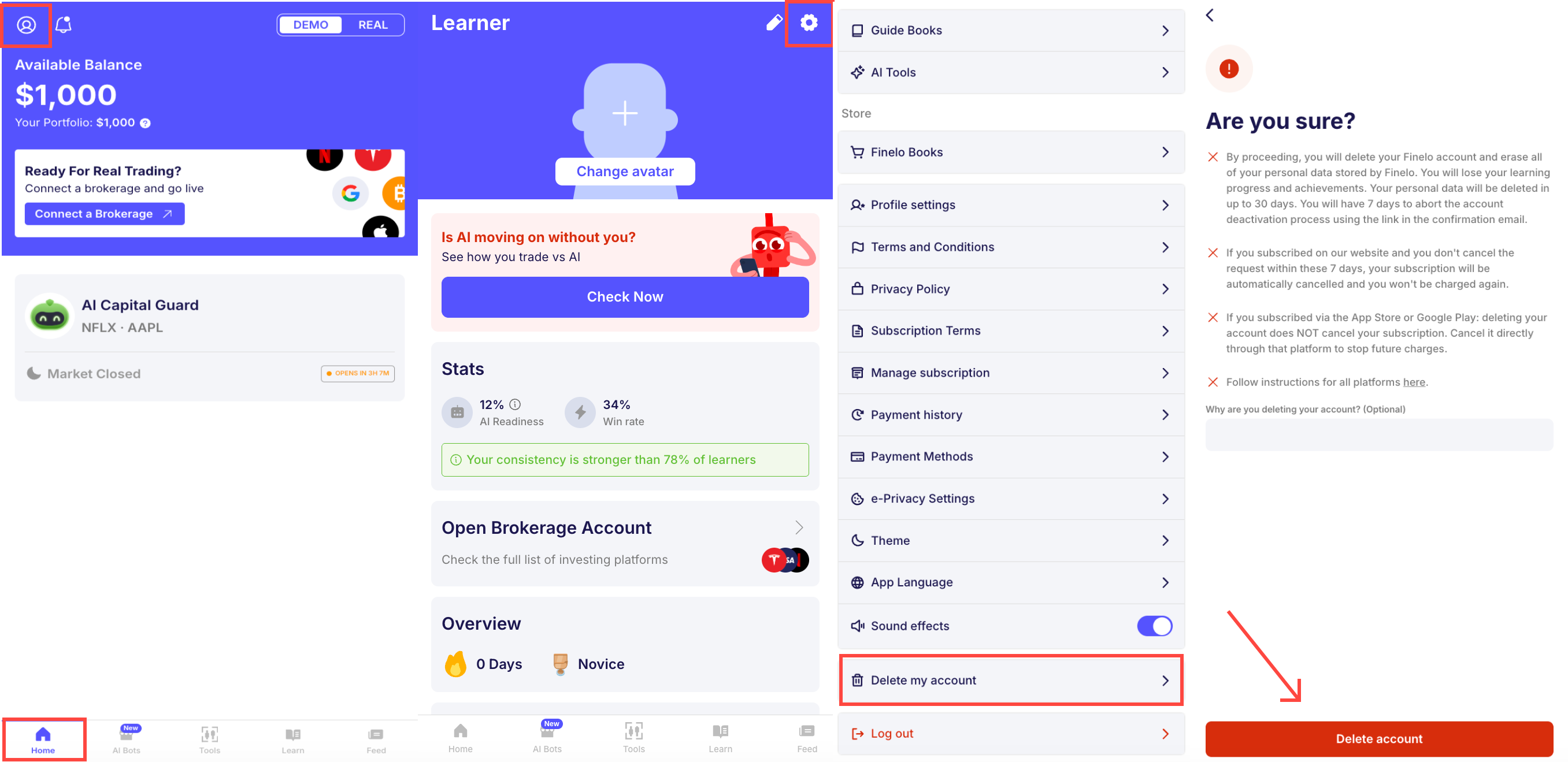
How can I delete my personal data?
How to remove my account and delete personal data?
At Finelo, we prioritize your privacy. You can request deletion of your account and personal data directly in the app or by contacting our support team.
Deleting your account in the app
To delete your account and personal data from within the app, go to Profile → Settings → Delete my account and confirm your request. After that:
- You'll receive a confirmation email. To proceed with the deletion, click the confirmation link in that email.
- Once confirmed, your account is deleted on the 7th day after your request.
- Your personal data is then fully erased within 23 days.
- Your subscription is canceled, and you will not be billed again.
Requesting deletion by email
Alternatively, you can request deletion by contacting us:
- Contact us at privacy@finelo.com with your request.
- Make sure to include the email address linked to your account.
We'll handle the rest and ensure your data is deleted.
Important note! Please note that we cannot delete only partial data, such as card details; the entire account and all associated data will be erased. When you request to delete your account, all your information from the app and web will be deleted, including personal, login details, and any other data we hold.